If you're running one AI agent that answers a few questions a day, cloud APIs are fine. The cost is negligible. But the moment you scale to multiple agents handling hundreds or thousands of tasks daily (content drafting, customer service routing, workflow monitoring, data extraction), cloud API costs start looking like a salary line item.
The good news: open-source AI models have gotten dramatically better. A model running on a $2,400 Mac Mini can now handle 85% of the tasks you'd otherwise send to Claude or GPT-4. The remaining 15% still benefits from cloud quality. The result is a hybrid approach that cuts costs by 60% while maintaining 98% of cloud-level quality.
Here's the honest math.
What Cloud AI Actually Costs
Let's use Claude Sonnet as the benchmark. It's the model most businesses use for production AI work. Current pricing (March 2026):
- Input tokens: $3.00 per million
- Output tokens: $15.00 per million
- Batch API: Half price, but adds latency
Those per-token costs sound small. They're not, once you multiply by volume.
The Four-Agent Scenario
Consider a typical multi-agent setup for a small business: a coordinator that delegates work, a marketing agent that drafts content, a support agent that handles FAQs, and an operations agent that monitors workflows. Four agents, running throughout the business day.
Light usage, 500 requests per day per agent, averaging 1,000 input tokens and 500 output tokens each:
- Per agent per day: $1.50 (input) + $3.75 (output) = $5.25
- Four agents: $21/day = $630/month = $7,560/year
Heavy usage, 2,000 requests per day per agent, with longer prompts (2,000 input + 1,000 output tokens):
- Per agent per day: $12 (input) + $30 (output) = $42
- Four agents: $168/day = $5,040/month = $60,480/year
Important context: These figures use Sonnet, a premium model. Cost-efficient cloud models like Claude Haiku or GPT-4o Mini run 10-20x cheaper, potentially $50-150/month for the same agent count. The tradeoff is lower reasoning quality on complex tasks. The business case for local hardware is strongest when you need premium-tier quality at scale.
$60,000 a year is a full-time employee. For AI API calls.
What Local Hardware Costs
A Mac Mini M4 Pro with 64GB of unified memory costs $2,399. It can run a 70-billion-parameter model, the kind of model that handles content drafting, summarization, classification, and structured responses very well. It consumes about 30 watts under AI workload.
- Hardware: $2,399 (one-time)
- Electricity: ~$33/year at $0.12/kWh
- Models: Free (Llama, Qwen, Mistral, all open source)
- Year 1 total: ~$2,432
- Year 2+ total: ~$33/year
For more demanding workloads, a Mac Studio M4 Max with 128GB runs $3,499-$4,499 and can handle the largest open-source models at full quality.
Break-Even Is Fast
Even at light usage, the hardware pays for itself in about 3.5 months. At heavy usage, it pays for itself in 13 days.
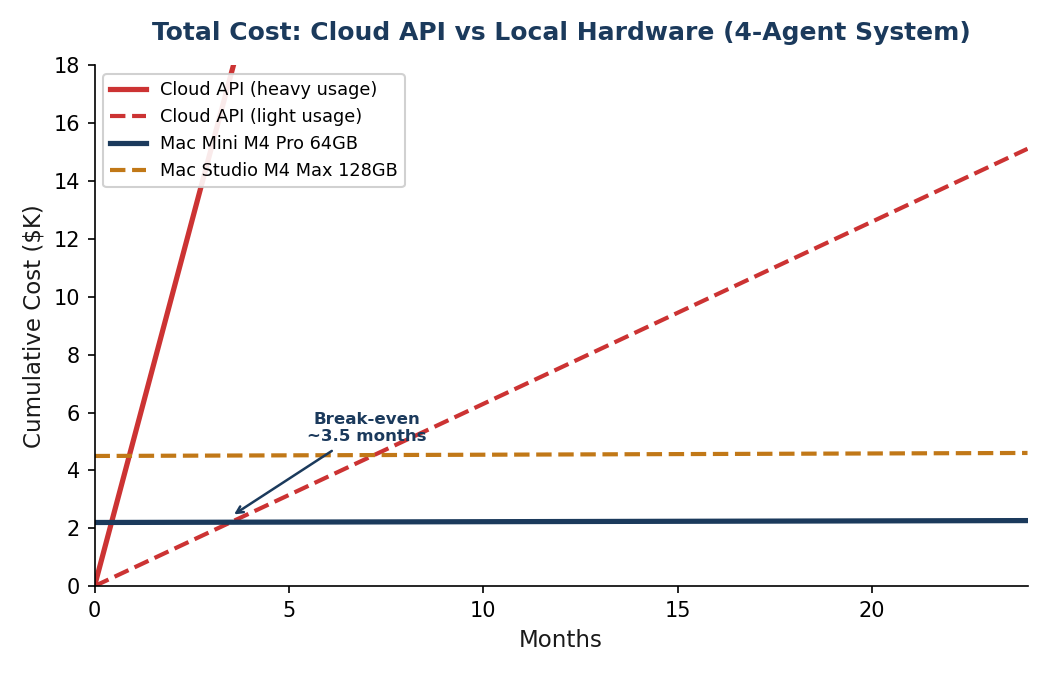
After the break-even point, you're running AI for free. Just the cost of electricity. Year two onward, the savings compound dramatically.
The Quality Question
Cost means nothing if the output is garbage. So here's the honest quality comparison.
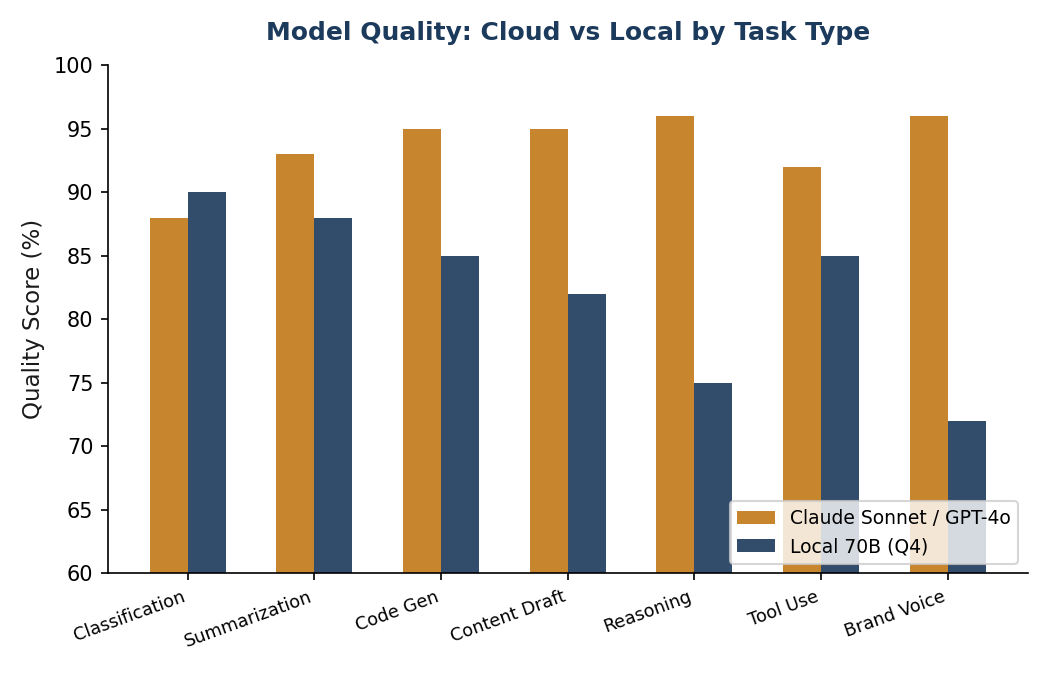
Open-source models have improved dramatically. In 2023, the best local models achieved roughly 72% of GPT-4 quality. By early 2026, the best open-source models reach 85-95% of cloud model quality, depending on the task, with Llama 3.1 70B benchmarks and enterprise model comparisons confirming the narrowing gap.
Where Local Models Are Good Enough
For these tasks, a local model produces output that is nearly indistinguishable from cloud models:
- Document classification and routing: a 7B model can classify tickets, route emails, and tag content at near-cloud quality. This is one of the strongest use cases for local inference.
- Summarization: 30B+ models produce summaries that are hard to tell apart from Claude's output.
- First-draft content: blog posts, emails, social media copy. Local models draft well; you can use cloud APIs for final polish if the piece is client-facing.
- Data extraction: pulling structured data from unstructured text (invoices, forms, emails) into JSON. Local is excellent here.
- Code scaffolding: models like Qwen 2.5 Coder are genuinely competitive with cloud models for code generation.
- FAQ and template-based responses: structured, predictable output with low ambiguity. An 8B model handles this fine.
Where Cloud Models Still Win
Be honest about the gaps. Cloud models are materially better at:
- Complex multi-step reasoning: chaining logic across many steps, weighing trade-offs, handling ambiguity. Claude and GPT-4 are noticeably better here.
- Nuanced brand-voice writing: final client-facing content, the piece that goes on your website or in a proposal. Benefits from frontier model quality.
- Novel problem solving: when the task is genuinely new or unusual, not a pattern the model has seen before.
- Long context synthesis: combining information across 50,000+ token documents. Local models have smaller practical context windows.
The Hybrid Approach
The answer is not "all local" or "all cloud." The answer is both.
Route 85% of queries to local models (classification, routing, drafts, extraction, monitoring). Send the remaining 15% to cloud APIs (complex reasoning, final content, edge cases). Result: ~60% cost reduction, ~98% of cloud quality.
This is not a theoretical recommendation. According to research on enterprise LLM deployment costs, approximately 40% of enterprises with AI workloads have already adopted some form of hybrid local/cloud architecture. The pattern is the same everywhere: local handles the volume, cloud handles the hard problems.
In practice, this means your coordinator agent, the one making delegation decisions and handling escalations, stays on Claude. Your marketing, support, and operations agents run locally. During high-stakes periods (a product launch, Black Friday), you can temporarily route specific agents back to cloud with a config change.
Hidden Costs and Honest Trade-offs
The cost comparison above is accurate but incomplete. Here's what else to factor in:
- Your time. Installing Ollama and running your first model takes about 30 minutes. But a full production system (multiple agents, remote access, security hardening) is a much larger project (see the full breakdown). Ongoing maintenance is minimal once it's set up, but it's not zero.
- No SLA. If your Mac Mini hardware fails, you're responsible for the fix. Cloud APIs have uptime guarantees. For a small business, this is manageable. For a business where AI downtime means lost revenue, keep a cloud fallback configured.
- No built-in monitoring. Cloud providers give you usage dashboards, rate limiting, and abuse detection. Locally, you build this yourself or go without. For most small businesses, basic health checks suffice.
- Model updates. When a better model comes out, you pull it manually. Cloud providers update seamlessly. In practice, this means running
ollama pullonce every few months.
None of these are deal-breakers. They're just things to know going in.
Who Should Consider This
Local AI inference makes sense if:
- You're running (or planning) multiple AI agents
- Your AI costs are trending above $300/month
- Most of your AI tasks are structured and repeatable (not novel reasoning)
- You value data privacy. Local models never send your data to a third party
- You have a Mac with Apple Silicon (or are willing to buy one)
It does not make sense if you're running a single chatbot with light usage. The complexity isn't worth it for $20/month in API costs.
Key Takeaways
- A four-agent system costs $7,500-$60,000/year on cloud APIs depending on volume
- The same workload runs on a $2,400 Mac Mini for $33/year in electricity
- Break-even: 2 weeks to 3.5 months depending on usage
- Local models handle 85% of business AI tasks at near-cloud quality
- The hybrid approach (local + cloud) delivers 98% quality at 40% cost
- Data never leaves your building. No third-party privacy concerns
Want to figure out whether local AI makes sense for your specific situation? I can map your current AI costs, identify which tasks can move local, and help you set up the hybrid infrastructure. Connect on LinkedIn.