If you've looked into running AI models locally, you've probably seen recommendations for NVIDIA GPUs. They're the industry standard for AI training and inference. But for a small business that wants to run AI models on-site (not train them from scratch), Apple Silicon has a structural advantage that changes the math completely.
That advantage is unified memory. And once you understand it, the hardware decision becomes straightforward.
The GPU Memory Problem
Running an AI model means loading its "weights," billions of numbers that encode everything the model knows, into memory where the GPU can access them. A 70-billion-parameter model at 4-bit precision needs about 40 gigabytes of memory.
Here's where traditional PCs hit a wall.
An NVIDIA RTX 4090, the most powerful consumer GPU available, has 24GB of dedicated video memory (VRAM). That 40GB model literally does not fit. If you try to run it anyway, the system swaps data between GPU VRAM and system RAM over the PCIe bus, which is catastrophically slow. Inference that should take seconds takes minutes.
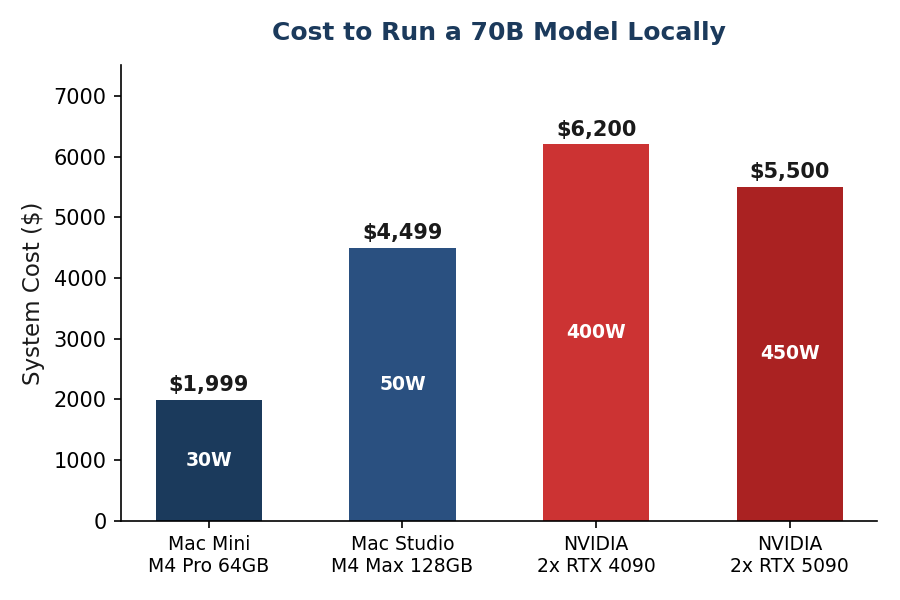
The solution on the NVIDIA side is to buy two RTX 4090s and split the model across them. That's $3,200+ in GPUs alone, plus a motherboard that supports multi-GPU, a beefy power supply, and the Linux configuration to make it work. Total system cost: $5,000-$6,000+.
How Unified Memory Changes Everything
Apple Silicon doesn't have separate GPU memory. The CPU, GPU, and Neural Engine all share the same physical memory pool. There's no PCIe bus bottleneck. The GPU accesses model weights directly from the same memory that the rest of the system uses.
A Mac Mini M4 Pro with 64GB gives the GPU access to the full 64GB. That same 70B model that doesn't fit on a $1,600 NVIDIA card runs fine on a $2,400 Mac Mini.
This is not a niche technical detail. It changes the price-to-capability ratio for local AI inference.
Memory Bandwidth: The Speed Factor
Memory bandwidth (how fast data can flow between memory and the processor) is the single biggest determinant of how fast a local model generates text. More bandwidth means more tokens per second.
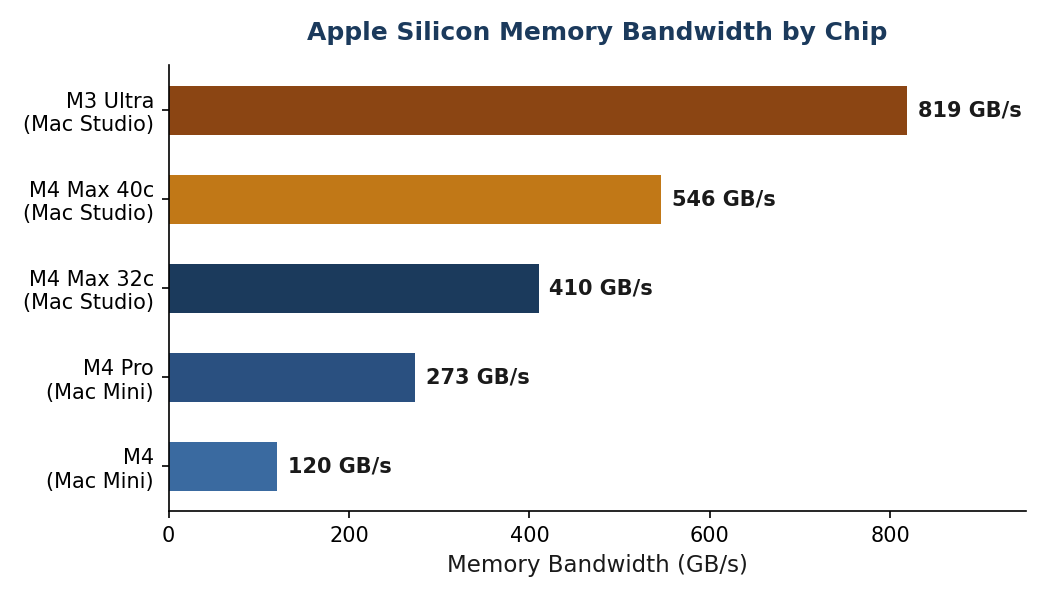
A key insight: an older M3 Max generates tokens faster than a newer M4 Pro because it has more memory bandwidth (400 GB/s vs 273 GB/s). When choosing hardware for AI inference, prioritize bandwidth over CPU core count.
In practical terms:
- M4 (120 GB/s): Fine for 7-8B models. Interactive speed for simple tasks.
- M4 Pro (273 GB/s): Good for up to 30B models. Comfortable for agent workloads.
- M4 Max (410-546 GB/s): Fast inference for 70B models. Production-grade.
- M3 Ultra (819 GB/s): The fastest single-unit Apple Silicon. Best for 70B+ models at high throughput.
Apple Silicon vs NVIDIA: The Honest Comparison
This isn't a "Apple is better at everything" argument. Both platforms have real strengths. A detailed 2025 comparison confirms the trade-offs. Here's what matters for a small business running local AI:
Where NVIDIA Still Wins
- Raw throughput. When a model fits entirely in NVIDIA VRAM, CUDA inference is faster than Apple's Metal. For a 30B model on a single RTX 4090, NVIDIA wins on speed.
- Batch inference. Serving multiple simultaneous users, a high-traffic API endpoint for example, favors NVIDIA's architecture.
- Training. If you want to fine-tune or train models (not just run them), NVIDIA is the only serious option. Apple Silicon is not competitive here.
- Ecosystem. More frameworks, more tutorials, more community support. CUDA has a decade head start.
Where Apple Silicon Wins
- Cost per GB of usable memory. Dramatically cheaper for large models. A 64GB Mac Mini costs $2,400. Getting 64GB of GPU memory on NVIDIA requires multiple cards and costs 2-3x more.
- Power efficiency. 5-10x better watts-per-token. A Mac Mini draws 30W under AI load. An NVIDIA system with two GPUs draws 400W+. Over a year of 24/7 operation, that's $33 vs $420 in electricity.
- Silence. No GPU fans. A Mac Mini is nearly silent, even under heavy inference load. Office-friendly. Closet-friendly. Bookshelf-friendly.
- Simplicity. macOS + Ollama works out of the box. No CUDA driver management, no Linux kernel configuration, no multi-GPU topology tuning.
- Complete system. A Mac Mini is a full computer with an OS, networking, storage, and all peripherals. An NVIDIA GPU is a component that needs a system built around it.
- Model size ceiling. 128GB in a Mac Studio M4 Max. 192GB in an M3 Ultra. Single-unit, no multi-GPU complexity.
Which Mac to Buy
Match the hardware to the workload:
- Experimenting or light agent work: Mac Mini M4, 24GB, $999. Run 7-8B models comfortably. Good for testing whether local AI works for your use case before investing more.
- Serious single-agent system: Mac Mini M4 Pro, 48GB, $1,799. Run 30B models at interactive speed. Good for a business with one primary AI agent.
- Multi-agent system: Mac Mini M4 Pro, 64GB, $2,399. Run a 70B model at Q4 quantization, or run multiple smaller models simultaneously. This is the sweet spot for most small business deployments.
- Maximum local capability: Mac Studio M4 Max, 128GB, $3,499+. Run 70B models at high quality (Q8) or 100B+ models at Q4. For businesses that need the best possible local inference.
The recommendation for most small businesses: Mac Mini M4 Pro, 64GB, $2,399. It runs capable models, fits on a shelf, draws 30 watts, and pays for itself in a few months of saved API costs.
What Models Run on Each Configuration
The size of model you can run depends entirely on your memory. As a rule of thumb, keep the model footprint under 60% of total RAM to leave room for the operating system, applications, and context window.
- 16GB: Llama 3.2 3B, Phi-4 Mini, Qwen 3 8B (Q4), Mistral 7B
- 24GB: Qwen 3 14B, DeepSeek-R1-Distill-14B, Llama 3.1 8B (Q8)
- 48GB: Llama 3.3 70B (Q4), Qwen 3 30B (Q6), DeepSeek-R1 32B
- 64GB: Llama 3.3 70B (Q4-Q5), DeepSeek-R1 32B (Q8), or multiple smaller models simultaneously
- 128GB: Llama 3.3 70B (Q8), 100B+ models (Q4)
All of these models are free and open source. Download them with a single command via Ollama. The entire setup, from unboxing a Mac Mini to chatting with a local AI model, takes under 30 minutes.
Real-World Performance Numbers
Forget marketing benchmarks. These are real-world generation speeds from independent benchmarks and community testing:
- Llama 3.2 1B on M4 Pro: ~95-100 tokens/second (instant)
- Qwen 2.5 7B on M4 (16GB): ~32-35 tokens/second (fast, comfortable)
- Llama 3.1 8B on M4 (16GB): ~28-32 tokens/second (comfortable)
- Qwen 3 30B on M4 Pro 64GB: ~12-18 tokens/second (usable for agent work)
- Llama 3.3 70B on M4 Max 128GB: ~12-20 tokens/second (usable)
For context: 20-30 tokens per second feels interactive. Like a fast typist. Above 12 tokens per second is fine for agent workloads where nobody is watching the output stream in real time.
Key Takeaways
- Apple's unified memory lets the GPU access all system RAM. No VRAM bottleneck
- A $2,400 Mac Mini runs 70B models that would need $5,000+ in NVIDIA hardware
- Memory bandwidth (not CPU cores) determines inference speed
- Mac Mini M4 Pro 64GB ($2,399) is the sweet spot for most small business AI
- 30W power draw vs 400W+ for NVIDIA, $33/year vs $420/year in electricity
- Setup takes 30 minutes with Ollama. No drivers, no Linux, no multi-GPU configuration.
Thinking about setting up local AI for your business? I can help you choose the right hardware, configure the models, and integrate local inference with your existing tools. Connect on LinkedIn.